Every ROM gets its cover.
Coverly ROMs checks your handheld's SD card, shows which games have no cover art and adds it in one go. It rehearses first, and nothing you already have is touched unless you say so.
- Free
- No account
- No telemetry
- Windows, macOS and Linux
- No coverGBAÆther Rally
- No coverSNESCastle Fighter
- No coverN64Chronicle Quest 64
- No coverMDNeon Harbor
- No coverGBCLunar Kart
- No coverGBPixel Saga III
- No coverPSAmber Route
- No coverNESSky Knights
- No coverGGDeep Coral
- No coverNEOGEOIron Valley
- No coverPCEMoth Lantern
- No coverPSPOrbit Derby
Four steps. The first two write nothing.
-
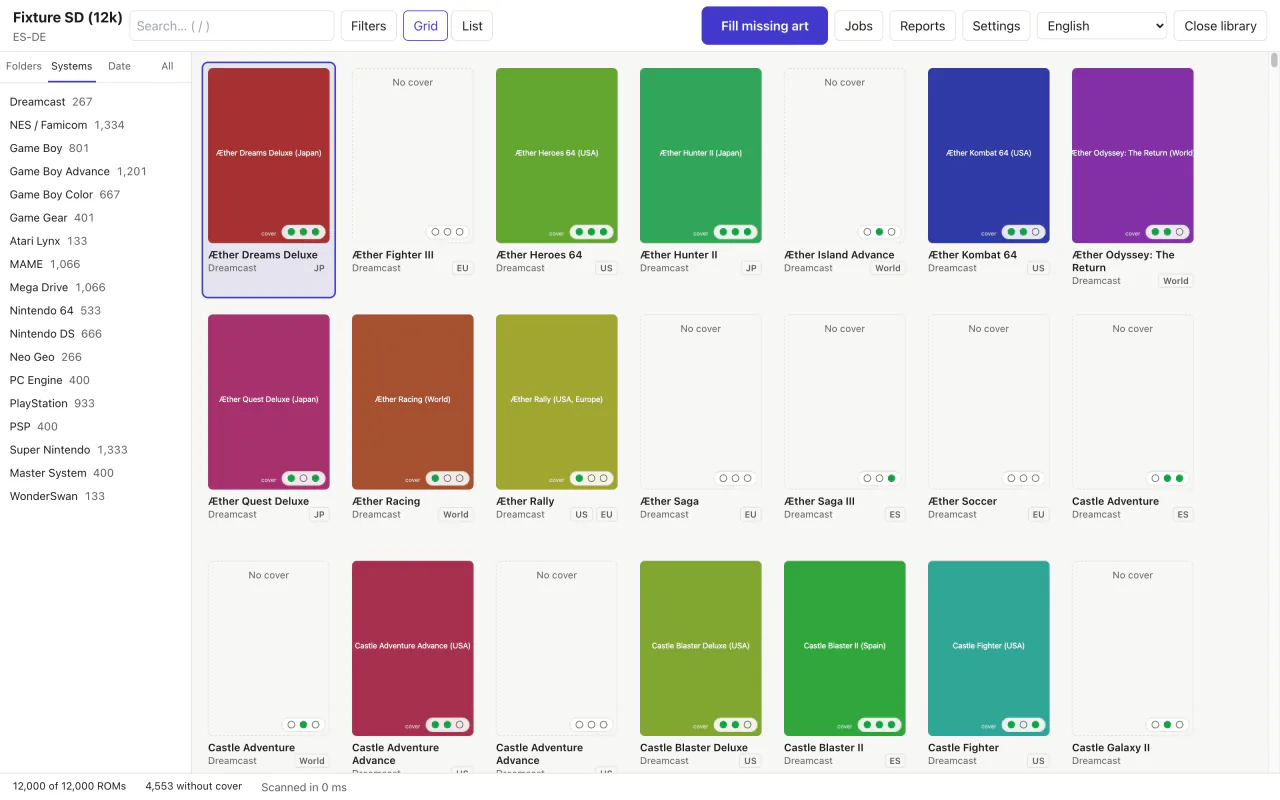
Open the folder or SD card.
Coverly recognises your firmware's or frontend's layout and shows every system with what it lacks: cover, screenshot or title screen. Libraries of more than 10,000 games too.
-
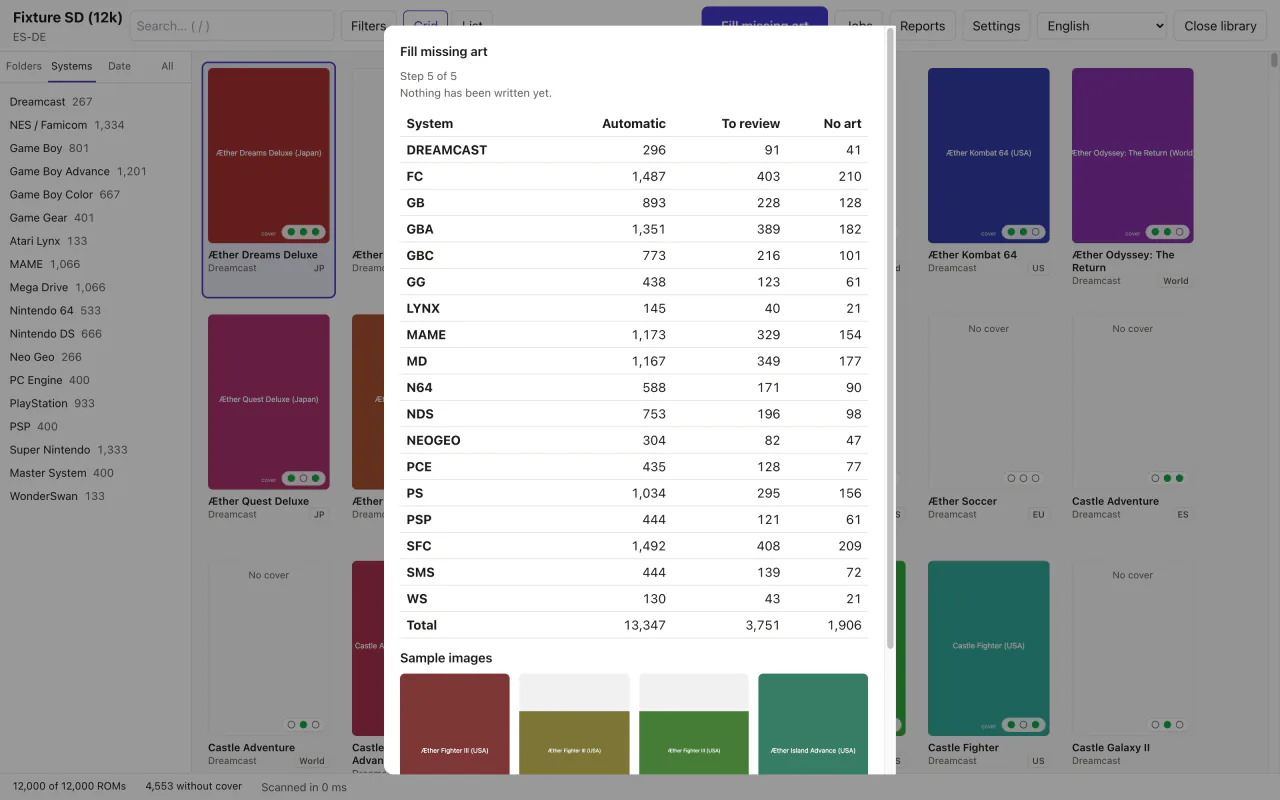
Rehearse the job first.
Each ROM is identified by its fingerprint (CRC32, MD5 or SHA1), or failing that by its name. The wizard picks the image by the ROM's region, your sources or the votes, and shows you the whole plan.
Nothing is written until you press Run.
-
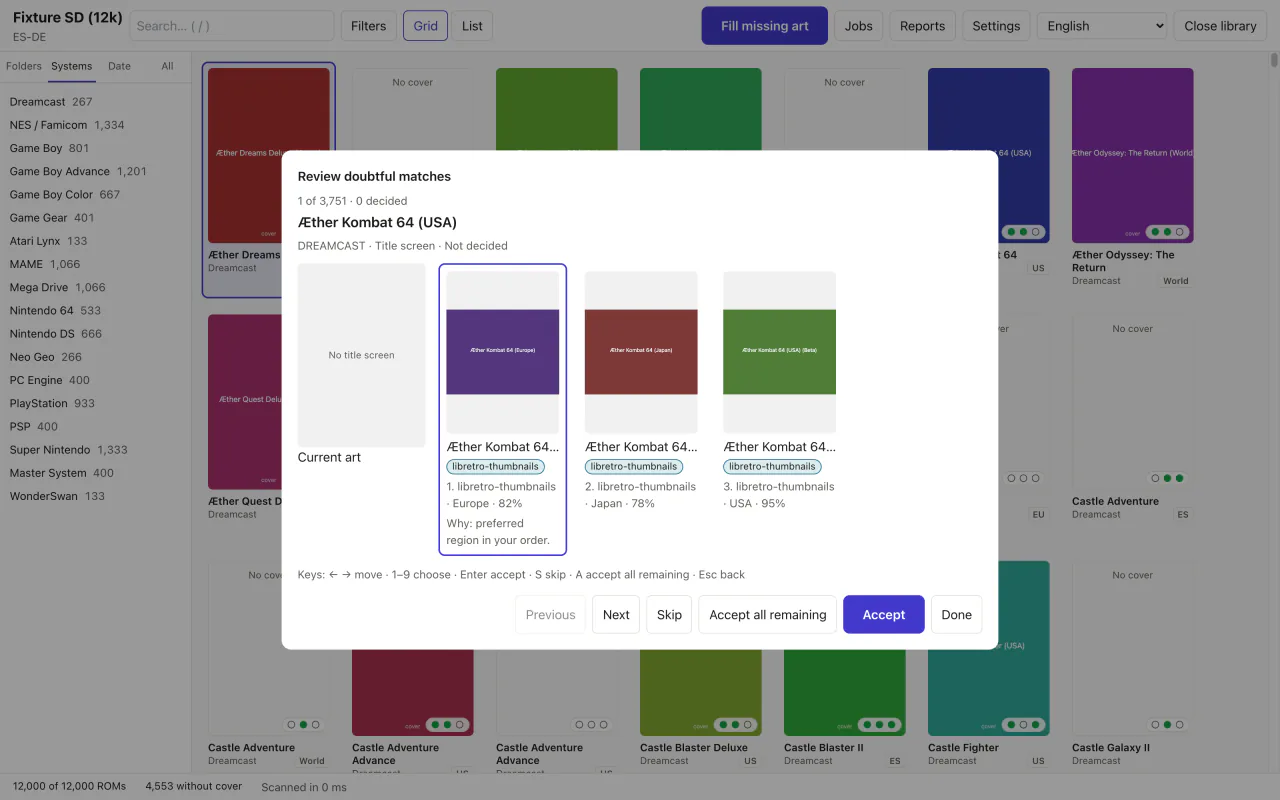
Decide only the doubtful ones.
Confident matches go through on their own. Doubtful ones wait in a queue you can clear from the keyboard, and the pick tells you why it was picked.
-
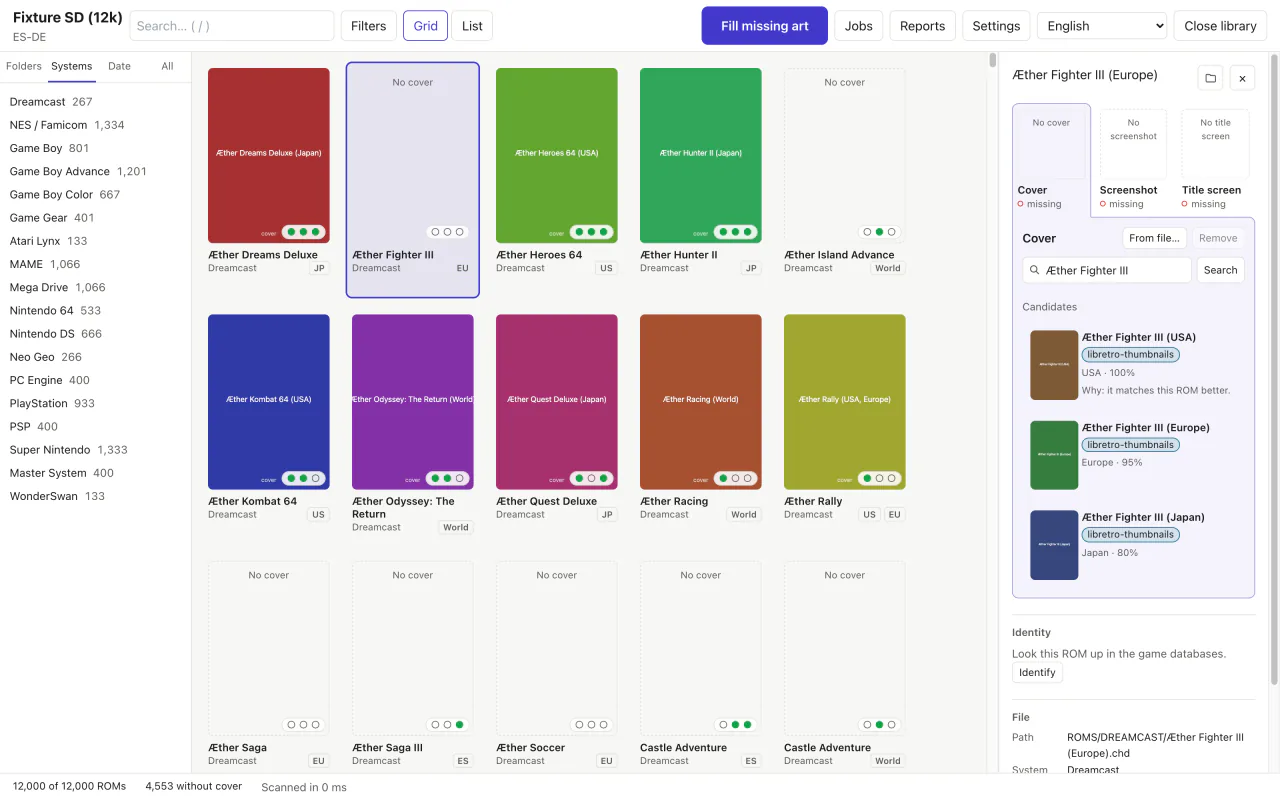
Apply it, and undo it if you change your mind.
Images are written one at a time, never left half-written. Undo puts the card back the way it was. And any cover can be swapped by hand from the game's panel.


Your card comes back as it was, plus covers.
- Dry run by default
- Writing is something you ask for. On the command line, with
--apply. - Only what is missing
- Covers you already have stay unless you choose to replace them, and then a copy is kept first.
- Backups off the card
- Copies and each job's log go to the app's data folder, not to the SD card.
- Nothing outside the library
- It never writes outside the folder you opened, and file names stay valid on FAT and exFAT.
- One failure stops nothing
- If one ROM fails, the rest carry on. Offline or rate-limited, the job pauses and you resume it later.

It writes where your handheld looks.
Eight firmware and frontend layouts, detected when you open the folder, and more than 50 systems under the folder names each one uses.
| Layout | Cover | Screenshot | Title |
|---|---|---|---|
| Anbernic stock | |||
| GarlicOS | |||
| Onion OS | |||
| MinUI and NextUI | |||
| muOS | |||
| ES-DE | |||
| Batocera, Knulli and EmulationStation | |||
| RetroArch |
On Batocera, Knulli and EmulationStation it also updates gamelist.xml, with undo. For other firmware, build your own layout with a live preview.
# What is missing (read-only)
$ coverly audit /Volumes/SD --missing-only

# The plan, nothing written
$ coverly fill /Volumes/SD

# For real, skipping the doubtful ones
$ coverly fill /Volumes/SD --apply --auto-only

# Changed your mind
$ coverly undo
How the alternatives compare.
The most complete ones run on Windows only or take some assembly; Coverly ROMs aims to be the safe choice on all three systems.
| Feature | Coverly ROMs | Skraper | Skyscraper | ARRM | Mini Scraper |
|---|---|---|---|---|---|
| Windows | Yes | Yes | — | Yes | Yes, x64 |
| macOS | Yes, Apple silicon and Intel | No native build | Build it yourself | No | Apple silicon only |
| Linux | x64 and ARM64 | Through Mono | Build it yourself | No | x64 |
| Desktop app | Yes | Yes | No, terminal | Yes | Yes |
Anbernic layout (Imgs/) | Built in | With setup | With setup and renaming | With setup | Built in |
| Account | No | ScreenScraper, in practice | Recommended | Recommended | No |
| Dry run and undo | Yes | — | — | — | — |
Where they are ahead
Skraper, Skyscraper and ARRM use ScreenScraper and bring videos, mixed images and metadata. Coverly ROMs only fills images. Mini Scraper also works without an account and already has releases out.
Sources: skraper.net, github.com/Gemba/skyscraper, jujuvincebros.fr and github.com/tzubertowski/mini-scraper-cfw.
Almost ready to download.
The first release is being prepared. When it lands, the installers for macOS, Windows and Linux, and the command line, will be right here.
No release published yet
This slot fills itself on release day. Until then you can build it from source: the README walks you through it.
What it does not do yet
- ScreenScraper: planned, not available yet.
- Videos, mixed images, marquees or wheels.
- Editing metadata, renaming or verifying ROMs.
- Running on the handheld itself.
- It has not been tested on real handhelds yet.
Before you ask.
Is it free?
Yes. It costs nothing, needs no account and has no paid tier. The code is AGPL-3.0.
Does it come with ROMs or cover art?
No. Coverly ROMs bundles no ROMs, BIOS files or game art. Images are downloaded from libretro-thumbnails and, if you add your own key, SteamGridDB. Every image belongs to its owners.
Will it overwrite my covers?
Not unless you ask it to. By default it only fills what is missing. If you choose to replace art, it first keeps a copy in the app's data folder, not on the card, and Undo puts it back.
Do I need an account?
No. libretro-thumbnails works without one. SteamGridDB is optional and uses your own key, kept in your system keychain.
Which handhelds does it work with?
Any that uses the Anbernic stock, GarlicOS, Onion OS, MinUI and NextUI, muOS, ES-DE, Batocera, Knulli and EmulationStation, or RetroArch layout. For other firmware you can build your own layout with a live preview. It has not been tested on real handhelds yet.
Why do Gatekeeper and SmartScreen warn me?
Because the downloads carry no Apple or Microsoft certificate. The first time, you just confirm that you want to open it, and every release comes with a SHA256SUMS file to check its downloads against.
Does it send data anywhere?
There is no telemetry. The app only talks to the art sources and, unless you turn it off, to the update check at startup. Images are re-encoded, so they carry no metadata.
How does it update?
From inside the app, with GitHub Releases builds verified with minisign before they install. There are stable and beta channels, and it never restarts in the middle of a job. The command line uses coverly update.
Open the card. See what is missing.
The rest is your call, with the dry run in front of you.